Connect
Universal Parts Catalog Redesign
The Universal Parts Catalog lets users browse generic items like tools, fluids, and accessories that don’t require exact vehicle fitment, using a category-based navigation.
Analytics showed that most users dropped off before adding anything to cart, with completion rates as low as 9% in some markets.
Role
End-to-End UX Researcher and UX/UI Designer
Duration
3 months
Tools
Figma, FigJam, Forms, Maze, Teams, GA4, Clarity
Problem to solve
Users struggled to find the right universal part due to inconsistent naming, too many navigation steps, and unclear categories.
Solution
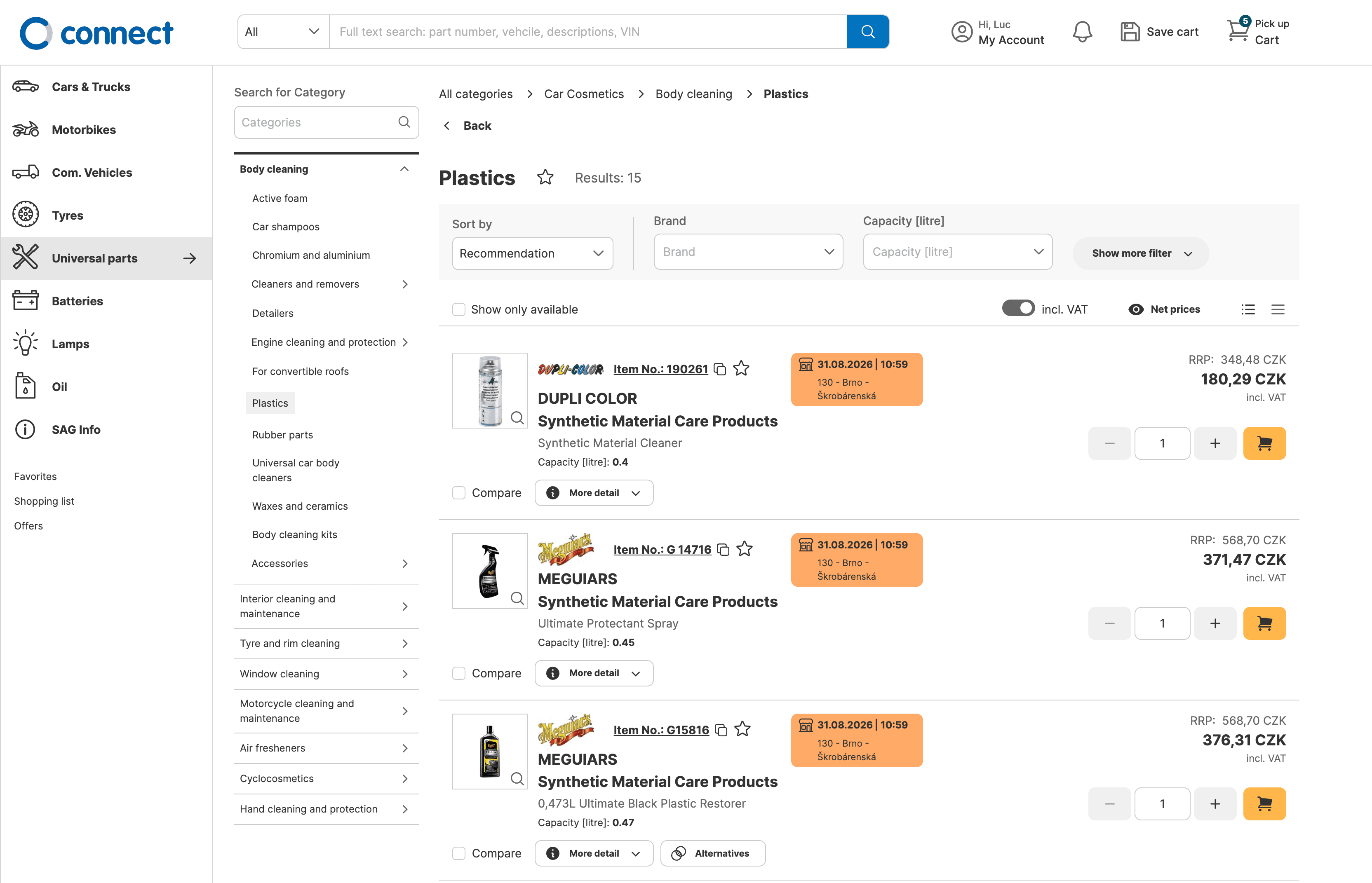
A reorganized category structure with fewer choices shown at once, visible subcategories inside each category card, clearer hierarchy, and a new "Top picks" feature letting users pin up to 5 frequently-used categories for quick access.
Final design



Background
The Universal Parts Catalogue was underused: GA4 showed that in every market, fewer than half of users who opened the catalog ended up adding anything to their cart, over the previous 30 days.
Our goals were to reduce time-to-order, increase add-to-cart by 15%+, reduce abandonment by 20% per country, and improve the overall UX.
From there, we defined a set of hypotheses to test:
H1
Reducing the number of choices shown at once will help users find the right category faster and reduce catalog drop-off by 20%.
H2
Presenting a clear hierarchy on the catalog main page will help users find the right category more quickly and reduce drop-off by 20%, by boosting search confidence.
H3
Providing representative visuals for categories/subcategories will reduce average session engagement time by 50% and increase add-to-cart by 20%.
H4
Showing subcategories under the related category (rather than hiding them) will reduce drop-off by 20% and cut engagement time by 50%.
H5
Adding shortcuts to favorite categories/subcategories will reduce engagement time and drop-off, since the needed category is found faster.
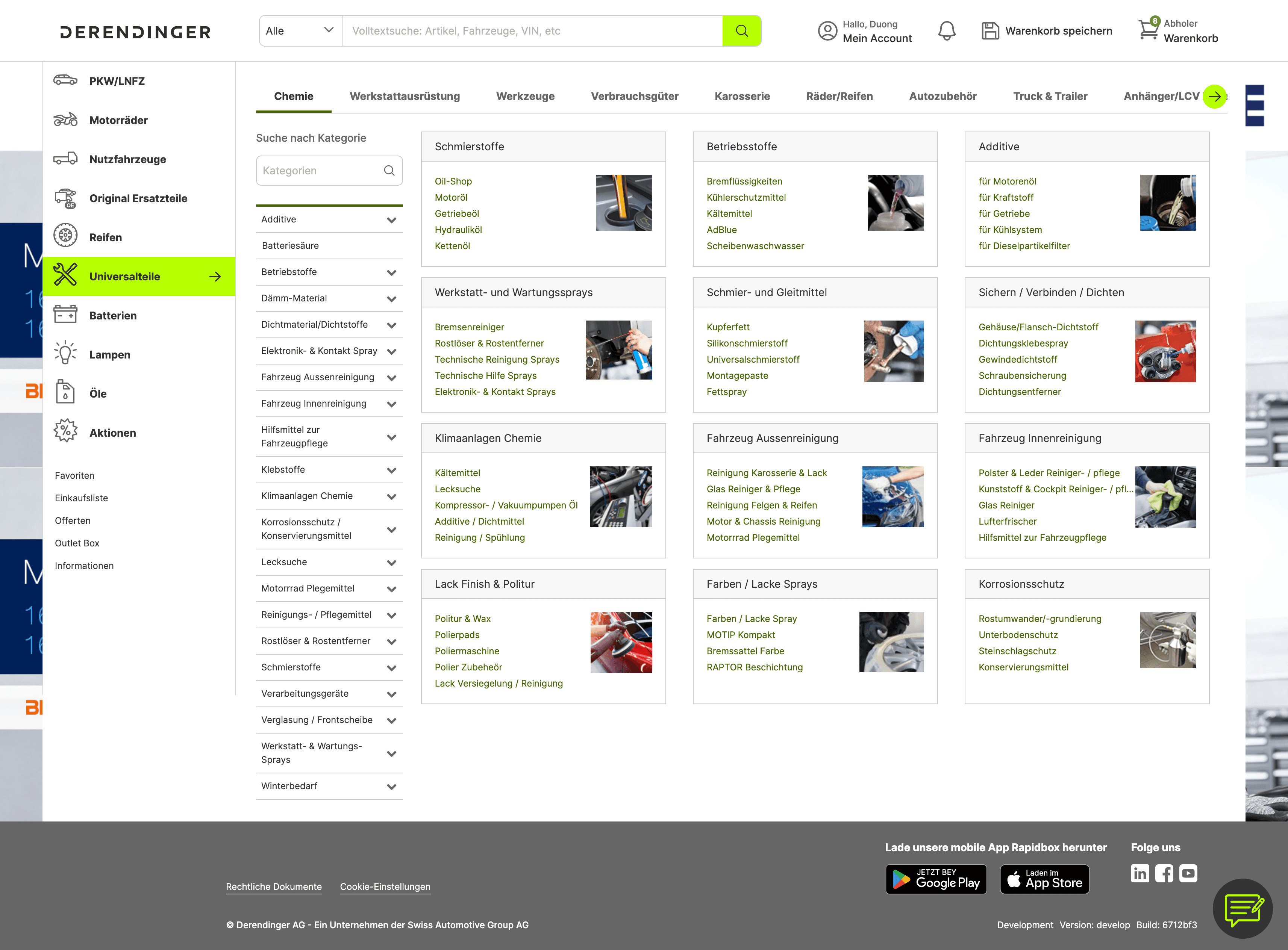
Universal parts catague before the redesign.
Research
Analytics
GA4 funnels across 5 markets, plus 83 Microsoft Clarity sessions with heatmaps over a 90-day window.
Survey
117 responses, 54-day duration, avg. completion time 6:23.
1:1 interviews
Customers, internal staff, and automotive professionals, based in Czech Republic.
Usability testing
265 responses, 13-day unmoderated test via Maze, 2 variants.
Heuristic evaluation
3 evaluators, Nielsen's 10 heuristics, cross-checked independently to catch violations.
Competitor analysis
7 competitors, simulating the user journey to see how each structures universal and where their navigation succeeds or breaks down.

Clarity click distribution across the category page. 36.26% of all clicks landed on category tiles, more than any other element.

Attention heatmap, focus concentrates on the top nav and first rows of tiles; everything below the average fold gets little to none.
What we found
37%
Said finding the right category took too many clicks. Reducing choices shown at once became the first design hypothesis.
55%
Of Clarity sessions included at least one dead click, an interaction with something that didn't respond.
36%
Of clicks landed on category tiles, but opened the sidebar instead of the category, the single biggest source of confusion in the original design.
Pain points
1
Navigation & Click Depth
Too many clicks to reach results; browser back button often fails; breadcrumbs don't update correctly when drilling down.
2
Category Structure & Placement
Items placed in unexpected categories (e.g. garage equipment inside universal parts, batteries misfiled)
3
Visual Hierarchy
Too many categories shown at once (50+) overwhelms users; large empty white space on cards; inconsistent image quality.
4
Category Accuracy
Navigation often led to no or irrelevant results: 15 of 117 users hit empty categories, while 13 found unexpected subcategories.
5
Tile/Click Behavior
Users expect tiles to act like links (open a new page); instead they sometimes expand the sidebar, creating rage clicks and confusion.
6
Personalization & Efficiency
No way to save filters or favorite subcategories before this project; no shortcuts to frequently used categories.
Define
Rather than fixing every issue raised, we prioritized what UX could actually solve: cognitive load and click depth. Search reliability, data and naming inconsistency, and VIN accuracy were real, but they were data and backend problems, not navigation ones, so they moved into a separate workstream.
That left three UX-addressable problems:
Choice overload: too many categories and subcategories shown at once, with no clear hierarchy to guide the first click.
Unclear click behavior: tiles expanded the sidebar instead of navigating to the category, the single largest source of dead clicks and confusion.
No quick access to frequent categories: every session starts from zero, regardless of what a user searched for last time.
How might we…
Simplify category navigation so users can find the universal part they need faster, in fewer, clearer steps.
Ideation
Two directions were explored for how subcategories should appear inside a category card:
Version 1 showed subcategories directly, with a "show more" button to reveal additional ones beyond what fit on screen.

Version 2 kept subcategories hidden until the user clicked into the category, trading a cleaner initial view for an extra step.

Both went into prototype testing rather than being narrowed down first, since the trade-off (visible now vs. clean now) wasn't obvious without user data.
Design
The category card
Each category card shows its image, name, and subcategories upfront, removing an extra click. Longer lists are scrollable, replacing the “show more” button after testing.
Click behavior
Clicking a tile always opens its category page, never the sidebar, fixing the original design’s biggest source of confusion (36% of all clicks) and creating a consistent rule across navigation levels.
Top picks
Users can pin up to five categories or subcategories for quick access, addressing the request to favorite frequently used categories. Pinned items appear on the catalog homepage, with a replace-oldest prompt when the limit is reached.
Link types
Distinct icons for internal categories, external links, PDFs, and video, so users know what a click will do before clicking it, addressing the "unclear what this does" feedback from Clarity and heuristic evaluation.

Supporting different content types.

Quick access to frequently used categories.
Testing & Iterations
01 / TWO DIRECTIONS, ONE HYBRID ANSWER
V1 vs V2 led to a merged design
V1 showed subcategories upfront, but “show more” and smaller images hurt usability. V2 kept the view cleaner but added an extra click. Both felt overwhelming at 50+ categories, leading to a hybrid: visible subcategories, clearer imagery and a cleaner layout.
02 / SEARCH MATTERED MORE THAN BROWSING
Users said it themselves, before launch
Testing surfaced a blunt piece of feedback: for users who already know what they're looking for, improving search mattered more than reorganizing categories. It's a signal the post-launch data would later confirm.
03 / FINDING A SPECIFIC ITEM WAS FAST
Goal 1: locate brake fluid DOT3
96.8% success, 3.1% drop-off, 33.4s average. 79% rated it easy or very easy, confirming the reorganized hierarchy got users to the right item quickly.
04 / GETTING BACK WAS EASY, BUT MESSY
Goal 2: return to the catalog overview
93.8% of users completed this task, and did it faster than Goal 1 (22.4s average). But 67.8% of them clicked the wrong thing at least once before getting there, the highest error rate of either task. Most people succeeded, but most people also got confused first.
Results
The redesigned catalog performed strongly once users reached it, while post-launch data revealed opportunities beyond browsing.
Switzerland
Jan–AUG 2026
catalog performance
1.27M
Catalog views
28.8%
Added to cart
21.3%
Purchased
Top Picks adoption
117
Pins
17
Unpins
Strong conversion once users reached the catalog, with early adoption of Top Picks.
Czech Republic
Mar–May 2026
search vs catalog
Kč327M
Search
Kč32M
Catalog
Search generated ~10× more revenue from only 1.6× more active users, revealing the next opportunity beyond catalog browsing.
Final Thoughts
01
Testing two extremes can reveal the answer is neither.
V1 and V2 were opposing bets, one image-heavy, one click-light. Users didn't pick a winner, they wanted both.
02
Success rate isn't the whole story.
Both validated tasks hit 90%+ success, but misclick rates stayed high (49.8% and 67.8%). Users reached the goal, just not always cleanly on the first try.
03
Iteration doesn't stop at the test.
The "show more" fix came after the Maze test had already closed. It took a separate feedback source to surface it.
04
A better catalog doesn't replace the need for better search.
Even after the redesign, search generated 10× more revenue with only 1.6× more users, showing where most of the value remains.